Functions
The following hashing functions are supported by string substitution in the body of a webhook (content area), not the headers.
- sha1
- sha256
- sha512
In addition, users can use the following transformation functions for their text
- lower
- upper
- normalizePhone
normalizePhone strips all non-digit characters from a phone number. For example, normalizePhone(+1 (555) 123-4567) returns 15551234567.
These must be used exactly as above. Trying to use ‘Sha1’ or ‘UPPER’ will not work. Unsupported function names are ignored and left as-is. Parentheses inside raw argument values (such as the area code in a phone number) are handled automatically.
The functions can be nested if it makes sense to do so, such as ‘sha1(lower( … ))’.
Here’s an example of JSON body content for a Teams webhook. The customer’s own webhook may require a different JSON structure, or may even use a different format such as XML.
Note that text must be quoted. Replacements such as {{dsarDetails.email}} do not need quotes around them. (See below).
{
    "type": "message",
    "attachments": [
        {
            "contentType": "application/vnd.microsoft.card.adaptive",
            "content": {
                "$schema": "http://adaptivecards.io/schemas/adaptive-card.json",
                "type": "AdaptiveCard",
                "version": "1.5",
                "body": [
                    {
                        "type": "TextBlock",
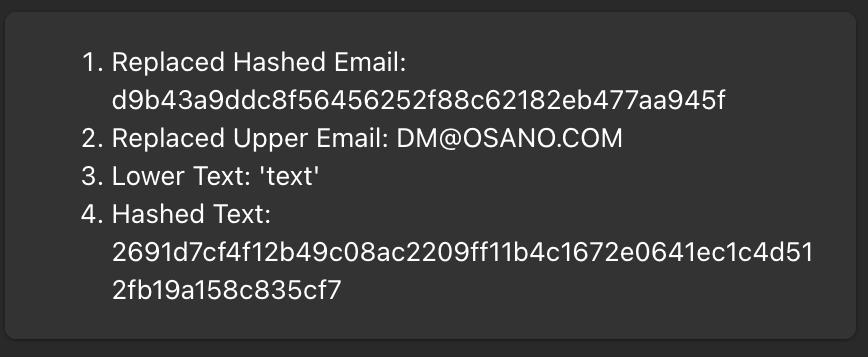
                        "text": "1. Replaced Hashed Email: sha1({{dsarDetails.email}})\r2. Replaced Upper Email: upper({{dsarDetails.email}})\r3. Lower Text: lower('Text')\r4. Hashed Text: sha256('text')",
                        "wrap": true
                    }
                ]
            }
        }
    ]
}
The result would be something like this, in which the data was hashed and then sent to the webhook URL:
Default / Fallback Values
When a variable might not be present for every event, you can provide a fallback value using either of two syntaxes. Both work only in the body of a webhook.
Coalesce syntax
{{coalesce(variableName, 'default value')}}
If variableName is missing or null, the fallback string is used instead.
Pipe syntax
{{variableName | 'default value'}}
This is a shorthand that behaves identically to coalesce.
Example
{
    "name": "{{coalesce(dsarDetails.given-name, 'Unknown')}}",
    "phone": "{{dsarDetails.phone-number | 'N/A'}}"
}
If dsarDetails.given-name is not available, the payload would contain "name": "Unknown". If dsarDetails.phone-number is present, its actual value is used; otherwise the payload would contain "phone": "N/A".
Unresolved Variables
If a variable has no value and no fallback is provided, the placeholder is handled automatically depending on where it appears in the body:
- JSON value position — the placeholder resolves to
null(unquoted). For example,"middleName": "{{dsarDetails.middleName}}"becomes"middleName": null. - Inside a string — the placeholder is removed, leaving the surrounding text intact. For example,
"greeting": "Hello {{dsarDetails.middleName}} World"becomes"greeting": "Hello World".